
分布式配置中⼼应⽤场景
往往,我们使⽤配置⽂件管理⼀些配置信息,⽐如application.yml
单体应⽤架构,配置信息的管理、维护并不会显得特别麻烦,⼿动操作就可以,因为就⼀个⼯程;
微服务架构,因为我们的分布式集群环境中可能有很多个微服务,我们不可能⼀个⼀个去修改配置然后重启⽣效,在⼀定场景下我们还需要在运⾏期间动态调整配置信息,⽐如:根据各个微服务的负载情况,动态调整数据源连接池⼤⼩,我们希望配置内容发⽣变化的时候,微服务可以⾃动更新。
场景总结如下:
- 集中配置管理,⼀个微服务架构中可能有成百上千个微服务,所以集中配置管理是很重要的(⼀次修改、到处⽣效)
- 不同环境不同配置,⽐如数据源配置在不同环境(开发dev,测试test,⽣产prod)中是不同的
- 运⾏期间可动态调整。例如,可根据各个微服务的负载情况,动态调整数据源连接池⼤⼩等配置修改后可⾃动更新
- 如配置内容发⽣变化,微服务可以⾃动更新配置
那么,我们就需要对配置⽂件进⾏集中式管理,这也是分布式配置中⼼的作⽤。
Spring Cloud Config
Config简介
Spring Cloud Config是⼀个分布式配置管理⽅案,包含了 Server端和 Client端两个部分。
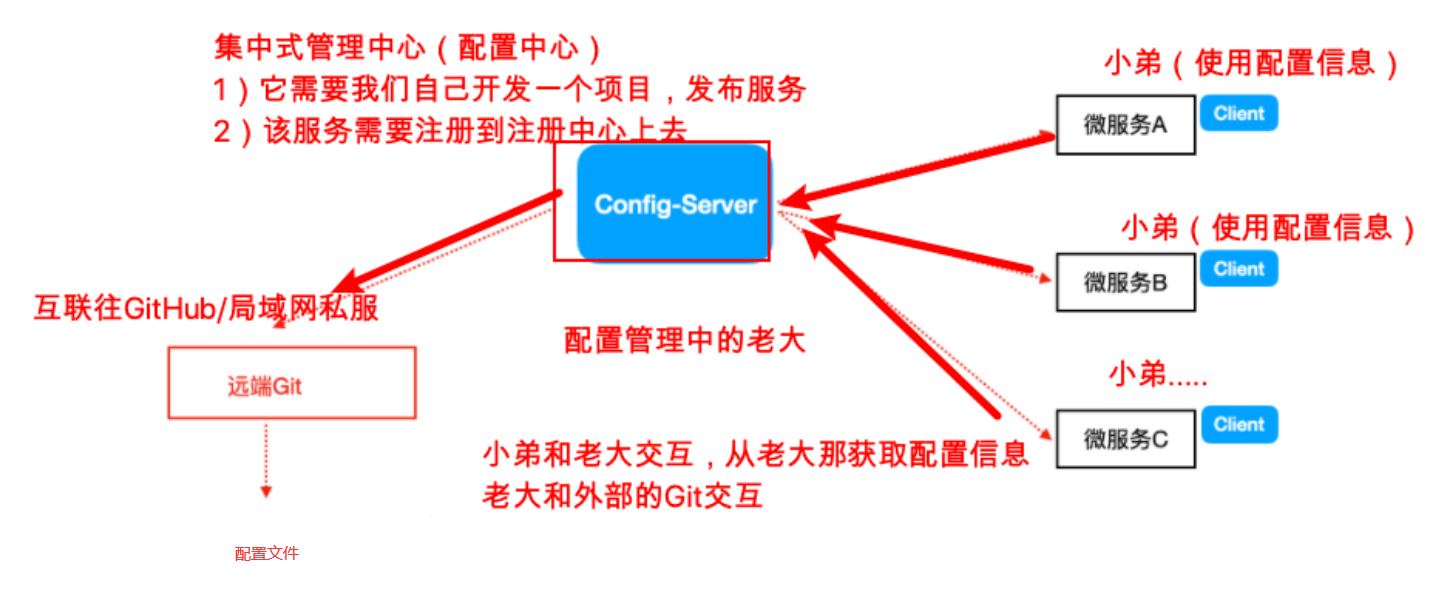
- Server 端:提供配置⽂件的存储、以接⼝的形式将配置⽂件的内容提供出去,通过使⽤@EnableConfigServer注解在 Spring boot 应⽤中⾮常简单的嵌⼊
- Client 端:通过接⼝获取配置数据并初始化⾃⼰的应⽤
Config分布式配置应⽤
说明:Config Server是集中式的配置服务,⽤于集中管理应⽤程序各个环境下的配置。 默认使⽤Git存储配置⽂件内容,也可以SVN。
⽐如,我们要对某个微服务的application.yml进⾏管理(区分开发环境、测试环境、⽣产环境)
- 登录码云或Github,创建项⽬config-repo
- 上传yml配置⽂件,命名规则如下:
-.yml 或者 -.properties
其中,application为应⽤名称,profile指的是环境(⽤于区分开发环境,测试环境、⽣产环境等)
示例:cloud-eureka-server-dev.yml、cloud-eureka-server-test.yml、cloud-eureka-server-prod.yml - 构建Config Server统⼀配置中⼼
新建SpringBoot⼯程,引⼊依赖坐标(需要注册⾃⼰到Eureka)
<?xml version="1.0" encoding="UTF-8"?>
<project xmlns="http://maven.apache.org/POM/4.0.0"
  xmlns:xsi="http://www.w3.org/2001/XMLSchema-instance"
  xsi:schemaLocation="http://maven.apache.org/POM/4.0.0
  http://maven.apache.org/xsd/maven-4.0.0.xsd">

  <parent>
    <artifactId>cloud-parent</artifactId>
    <groupId>com.cloud</groupId>
    <version>1.0-SNAPSHOT</version>
  </parent>

  <modelVersion>4.0.0</modelVersion>

  <artifactId>config</artifactId>

  <dependencies>
    <!--eureka client 客户端依赖引⼊-->
    <dependency>
      <groupId>org.springframework.cloud</groupId>
      <artifactId>spring-cloud-starter-netflix-eureka-client</artifactId>
    </dependency>
    <!--config配置中⼼服务端-->
    <dependency>
      <groupId>org.springframework.cloud</groupId>
      <artifactId>spring-cloud-config-server</artifactId>
    </dependency>
  </dependencies>
</project>
配置启动类,使⽤注解@EnableConfigServer开启配置中⼼服务器功能
application.yml配置
server:
  port: 9006
spring:
  cloud:
    config:
      server:
        git:
          # 配置git服务地址
          uri: https://github.com/4561651884/config-repo.git
          # 配置git⽤户名
          username: [email protected]
          # 配置git密码
          password: 851212834141aaa
          search-paths:
            - config-repo
      # 读取哪个分⽀
      label: master
测试访问:http://localhost:9006/master/cloud-eureka-server-dev.yml,查看到配置⽂件内容
4. 构建Client客户端(在已有的微服务基础上)
已有⼯程中添加依赖坐标
<dependency>
  <groupId>org.springframework.cloud</groupId>
  <artifactId>spring-cloud-config-client</artifactId>
</dependency>
application.yml修改为bootstrap.yml配置⽂件
bootstrap.yml是系统级别的,优先级⽐application.yml⾼,应⽤启动时会检查这个配置⽂件,在这个配置⽂件中指定配置中⼼的服务地址,会⾃动拉取所有应⽤配置并且启⽤。
(主要是把 与统⼀配置中⼼连接的配置信息 放到bootstrap.yml)
注意:需要统⼀读取的配置信息,从集中配置中⼼获取
bootstrap.yml:
server:
  port: 8080
spring:
  cloud:
    # config客户端配置,和ConfigServer通信,并告知ConfigServer希望获取的配置信息在哪个⽂件中
    config:
      # 配置⽂件名称
      name: cloud-eureka-server
      # 后缀名称
      profile: dev
      # 分⽀名称
      label: master
      # ConfigServer配置中⼼地址
      uri: http://localhost:9006
Config配置⼿动刷新
不⽤重启微服务,只需要⼿动的做⼀些其他的操作(访问⼀个地址/refresh)刷新,之后再访问即可
此时,客户端取到了配置中⼼的值,但当我们修改GitHub上⾯的值时,服务端(Config Server)能实时获取最新的值,但客户端(Config Client)读的是缓存,⽆法实时获取最新值。Spring Cloud 已经为我们解决了这个问题,那就是客户端使⽤post去触发refresh,获取最新数据。
- Client客户端添加依赖springboot-starter-actuator(已添加)
- Client客户端bootstrap.yml中添加配置(暴露通信端点)
management:
  endpoints:
    web:
      exposure:
        include: refresh
也可以暴露所有的端口
management:
  endpoints:
    web:
      exposure:
        include: "*"
- Client客户端使⽤到配置信息的类上添加@RefreshScope(统一配置中心里的属性值,可以通过@Value注解获取)
- ⼿动向Client客户端发起POST请求,http://localhost:8080/actuator/refresh,刷新配置信息
注意:⼿动刷新⽅式避免了服务重启(流程:Git改配置—>for循环脚本⼿动刷新每个微服务)
可否使⽤⼴播机制,⼀次通知,处处⽣效,⽅便⼤范围配置刷新?详细请看下一篇——消息总线Bus