FastDFS应用实战
SpringBoot访问FastDFS
引入jar依赖
<parent>
  <groupId>org.springframework.boot</groupId>
  <artifactId>spring-boot-starter-parent</artifactId>
  <version>2.0.5.RELEASE</version>
</parent>

<dependencies>
  <dependency>
 <groupId>org.springframework.boot</groupId>
 <artifactId>spring-boot-starter-web</artifactId>
  </dependency>
  <dependency>
 <groupId>com.github.tobato</groupId>
 <artifactId>fastdfs-client</artifactId>
 <version>1.26.1-RELEASE</version>
  </dependency>
</dependencies>
配置文件application.yml
fdfs:
  connectTimeout: 600
  trackerList:
 - 192.168.211.130:22122
 - 192.168.211.135:22122
 - 192.168.211.136:22122
server:
  port: 8899
编写上传下载文件的服务类
package com.fastdfs.service;

import com.github.tobato.fastdfs.domain.StorePath;
import com.github.tobato.fastdfs.proto.storage.DownloadByteArray;
import com.github.tobato.fastdfs.service.FastFileStorageClient;
import org.springframework.beans.factory.annotation.Autowired;
import org.springframework.stereotype.Component;

import java.io.ByteArrayInputStream;
import java.io.IOException;

@Component
public class FastDFSClientService {
  @Autowired
  private FastFileStorageClient fastFileStorageClient;
  /*
* 文件上传
*
* @param bytes 文件字节
* @param fileSize 文件大小
* @param extension 文件扩展名
* @return fastDfs路径
*/
  public String uploadFile(byte[] bytes, long fileSize, String extension) {
 ByteArrayInputStream byteArrayInputStream = new ByteArrayInputStream(bytes);
 StorePath storePath = fastFileStorageClient.uploadFile(byteArrayInputStream, fileSize, extension, null);
 System.out.println(storePath.getGroup() + ":" + storePath.getPath() + ":" + storePath.getFullPath());
 return storePath.getFullPath();
  }

  /*
* 下载文件
*
* @param fileUrl 文件URL
* @return 文件字节
* @throws IOException
*/
  public byte[] downloadFile(String fileUrl) throws IOException {
 String group = fileUrl.substring(0, fileUrl.indexOf("/"));
 String path = fileUrl.substring(fileUrl.indexOf("/") + 1);
 DownloadByteArray downloadByteArray = new DownloadByteArray();
 byte[] bytes = fastFileStorageClient.downloadFile(group, path, downloadByteArray);
 return bytes;
  }

}
控制器类
package com.fastdfs.controller;

import com.fastdfs.service.FastDFSClientService;
import org.springframework.beans.factory.annotation.Autowired;
import org.springframework.web.bind.annotation.RequestMapping;
import org.springframework.web.bind.annotation.RestController;
import org.springframework.web.multipart.MultipartFile;

import javax.servlet.ServletOutputStream;
import javax.servlet.http.HttpServletResponse;
import java.io.IOException;
import java.net.URLEncoder;

@RestController
@RequestMapping("/fastdfs")
public class FastDFSController {
  @Autowired
  private FastDFSClientService fastDFSClientService;

  @RequestMapping("/upload")
  public String uploadFile(MultipartFile file) throws IOException {
 byte[] bytes = file.getBytes();
 String originalFileName = file.getOriginalFilename();
 String extension = originalFileName.substring(originalFileName.lastIndexOf(".") + 1);
 String fileName = file.getName();
 long fileSize = file.getSize();
 System.out.println(originalFileName + ":" + fileName + ":" + fileSize + ":" + extension + ":" + bytes.length);
 return fastDFSClientService.uploadFile(bytes, fileSize, extension);
  }

  @RequestMapping("/download")
  public void downloadFile(String fileUrl, HttpServletResponse response) throws IOException {
 byte[] bytes = fastDFSClientService.downloadFile(fileUrl);
 response.setHeader("Content-disposition", "attachment;filename=" + URLEncoder.encode(fileUrl, "UTF-8"));
 response.setCharacterEncoding("UTF-8");
 ServletOutputStream outputStream = null;
 try {
   outputStream = response.getOutputStream();
   outputStream.write(bytes);
 } catch (IOException e) {
   e.printStackTrace();
 } finally {
   try {
     outputStream.flush();
     outputStream.close();
   } catch (IOException e) {
     e.printStackTrace();
   }
 }
  }

}
编写启动类
package com.fastdfs;

import com.github.tobato.fastdfs.FdfsClientConfig;
import org.springframework.boot.SpringApplication;
import org.springframework.boot.autoconfigure.SpringBootApplication;
import org.springframework.context.annotation.EnableMBeanExport;
import org.springframework.context.annotation.Import;
import org.springframework.jmx.support.RegistrationPolicy;

//解决jmx重复注册bean的问题
@EnableMBeanExport(registration = RegistrationPolicy.IGNORE_EXISTING)
//只需要一行注解就可以拥有带有连接池的FastDFS Java客户端了
@Import(FdfsClientConfig.class)
@SpringBootApplication
public class FastDfsApplicationMain {

  public static void main(String[] args) {
 SpringApplication.run(FastDfsApplicationMain.class, args);
  }
}
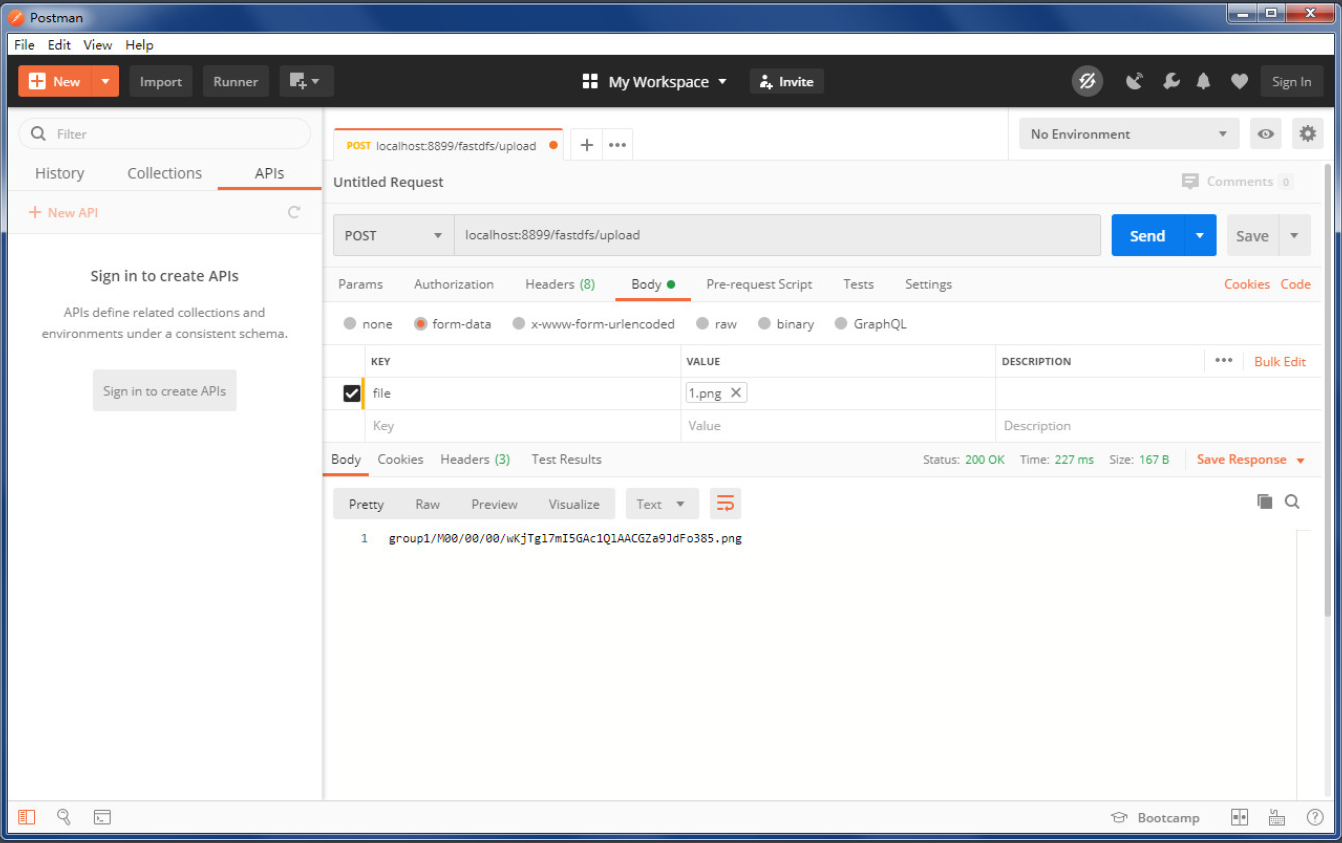
使用postman 进行测试
业务场景
头像上传

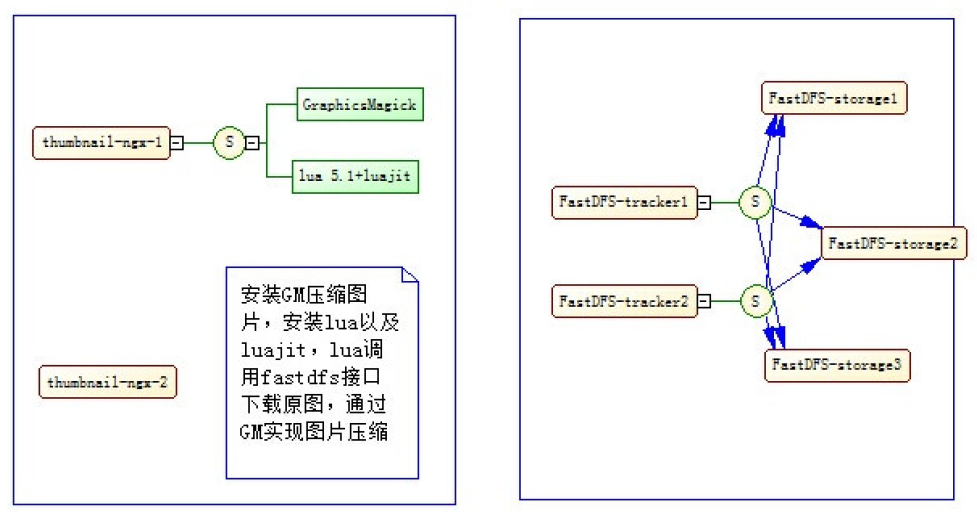
nginx头像缩略图
处理思路:
- 上传图片时,直接处理成缩略图,不是很灵活,业务很确定可以使用
先存储图片,使用时,实时计算
附件
上传附件

下载附件
思考:是使用直接的url,还是需要写一个处理请求
避免重复
解决方案:
上传成功后计算文件对应的MD5然后存入MySQL,添加文件时把文件MD5和之前存入MYSQL中的存储的信息对比。
参考:DigestUtils.md5DigestAsHex(bytes)。
评论已关闭