Apache Hadoop核心源码剖析
源码阅读准备
- 下载Apache Hadoop-2.9.2官方源码
将源码导入idea中
启动idea在提示界面选择导入
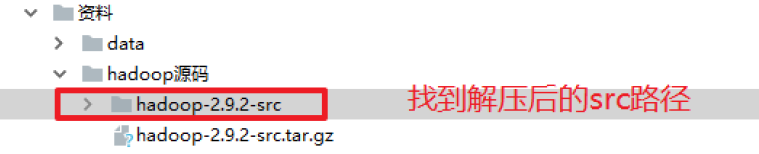
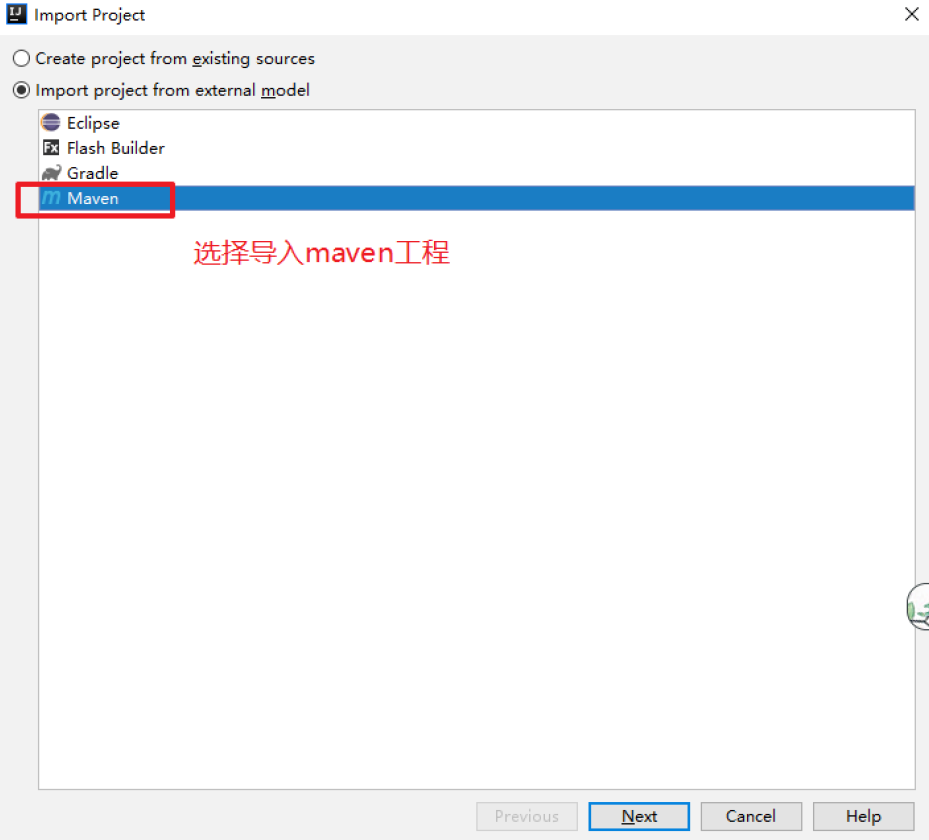
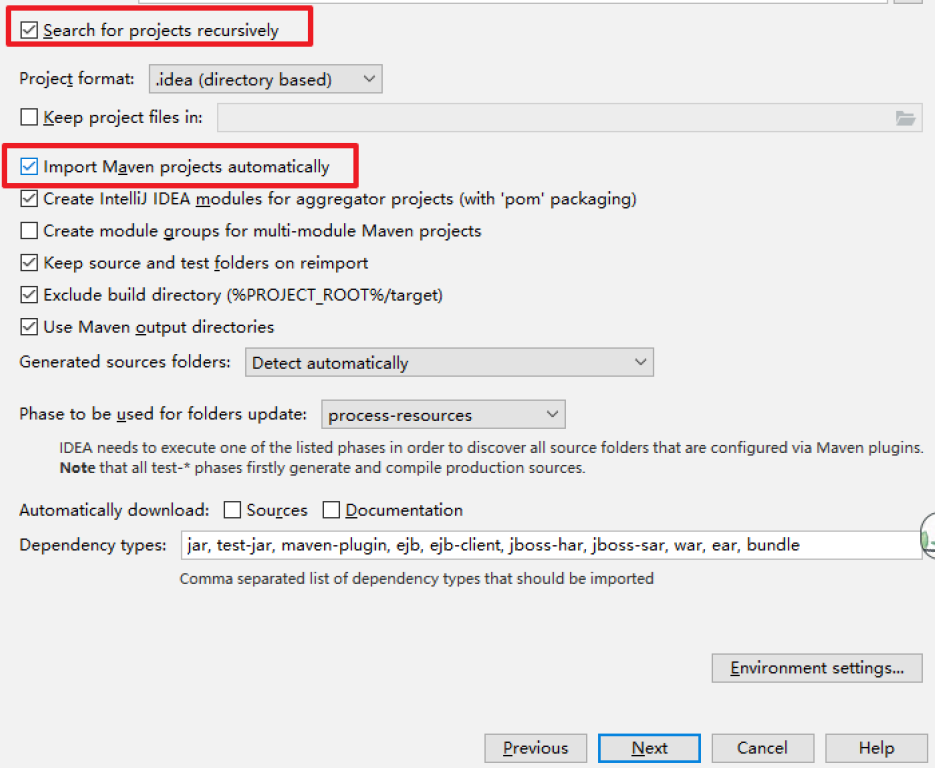
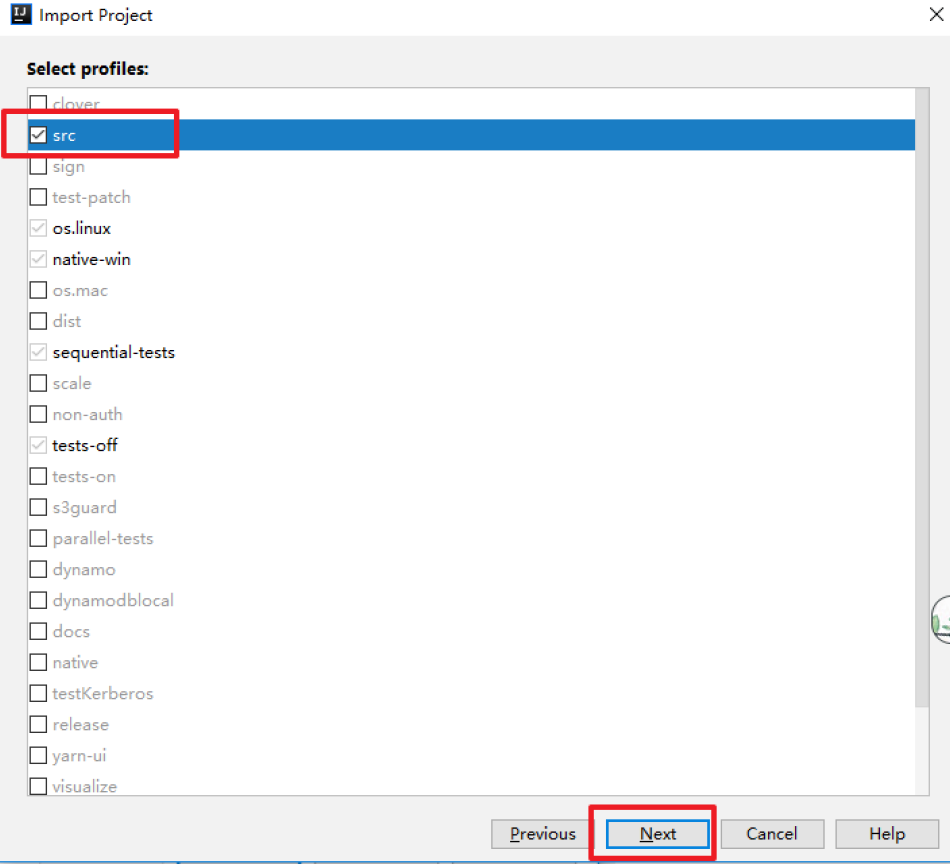
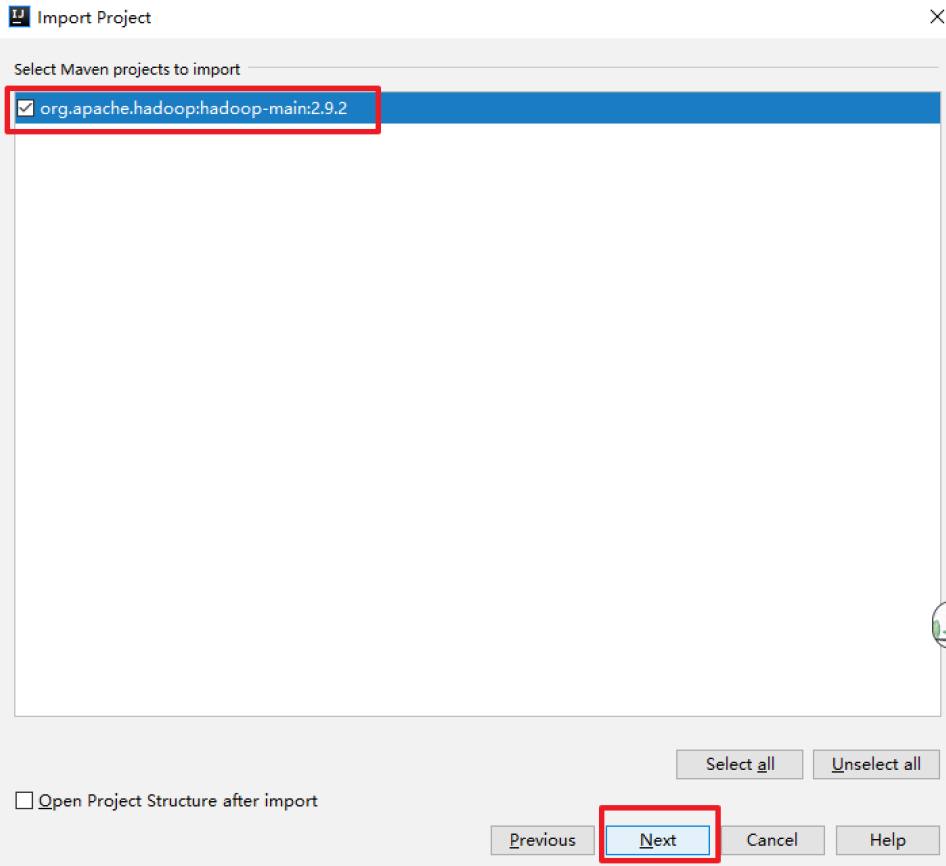
点击Finish
等待下载和解决依赖完成,源码导入成功!!NameNode 启动流程
命令启动Hdfs集群
start-dfs.sh该命令会启动Hdfs的NameNode以及DataNode,启动NameNode主要是通过org.apache.hadoop.hdfs.server.namenode.NameNode类。
重点关注NameNode在启动过程中做了哪些工作(偏离主线的技术细节不深究)
对于分析启动流程主要关注两部分代码:public class NameNode extends ReconfigurableBase implements NameNodeStatusMXBean { //该静态代码块主要是初始化一些HDFS的配置信息 static{ HdfsConfiguration.init(); //进入之后发现方法是空的,没有任何操作?其实不是观察HdfsConfiguration的静态代码块 } //HdfsConfiguration的类以及静态代码块 public class HdfsConfiguration extends Configuration { static { addDeprecatedKeys(); // adds the default resources Configuration.addDefaultResource("hdfs-default.xml"); Configuration.addDefaultResource("hdfs-site.xml"); } ... //main方法 public static void main(String argv[]) throws Exception{ //分析传入的参数是否为帮助参数,如果是帮助的话打印帮助信息,并退出。 if(DFSUtil.parseHelpArgument(argv,NameNode.USAGE,System.out,true)){ System.exit(0); } try{ //格式化输出启动信息,并且创建hook(打印节点关闭信息) StringUtils.startupShutdownMessage(NameNode.class,argv,LOG); //创建namenode NameNode namenode=createNameNode(argv,null); if(namenode!=null){ //加入集群 namenode.join(); } } catch(Throwable e){ //异常处理 LOG.error("Failed to start namenode.",e); terminate(1,e); } } ---------------------------------------------------------------------- //关注createNameNode public static NameNode createNameNode(String argv[], Configuration conf) throws IOException { LOG.info("createNameNode " + Arrays.asList(argv)); if (conf == null) conf = new HdfsConfiguration(); // Parse out some generic args into Configuration. GenericOptionsParser hParser = new GenericOptionsParser(conf, argv); argv = hParser.getRemainingArgs(); // Parse the rest, NN specific args. //解析启动的参数 StartupOption startOpt = parseArguments(argv); if (startOpt == null) { printUsage(System.err); return null; } setStartupOption(conf, startOpt); switch (startOpt) { .... default: { //正常启动进入该分支 //初始化metric系统 DefaultMetricsSystem.initialize("NameNode"); //返回新的NameNode return new NameNode(conf); } } } ---------------------------------------------------------------------- //NameNode的构造 public NameNode(Configuration conf) throws IOException { this(conf, NamenodeRole.NAMENODE); } ... protected NameNode(Configuration conf, NamenodeRole role) throws IOException { this.conf = conf; this.role = role; // 设置NameNode#clientNamenodeAddress为"hdfs://localhost:9000" setClientNamenodeAddress(conf); String nsId = getNameServiceId(conf); String namenodeId = HAUtil.getNameNodeId(conf, nsId); // HA相关 this.haEnabled = HAUtil.isHAEnabled(conf, nsId); state = createHAState(getStartupOption(conf)); this.allowStaleStandbyReads = HAUtil.shouldAllowStandbyReads(conf); this.haContext = createHAContext(); try { initializeGenericKeys(conf, nsId, namenodeId); // 完成实际的初始化工作 initialize(conf); // HA相关 try { haContext.writeLock(); state.prepareToEnterState(haContext); state.enterState(haContext); } finally { haContext.writeUnlock(); } } catch (IOException e) { this.stop(); throw e; } catch (HadoopIllegalArgumentException e) { this.stop(); throw e; } } //尽管本地没有开启HA(haEnabled=false**),**namenode依然拥有一个HAState,namenode的HAState状态为active. ---------------------------------------------------------------------- // 完成实际的初始化工作 // initialize(conf); protected void initialize(Configuration conf) throws IOException { if (conf.get(HADOOP_USER_GROUP_METRICS_PERCENTILES_INTERVALS) == null) { String intervals = conf.get(DFS_METRICS_PERCENTILES_INTERVALS_KEY); if (intervals != null) { conf.set(HADOOP_USER_GROUP_METRICS_PERCENTILES_INTERVALS, intervals); } } UserGroupInformation.setConfiguration(conf); loginAsNameNodeUser(conf); // 初始化metric NameNode.initMetrics(conf, this.getRole()); StartupProgressMetrics.register(startupProgress); // 启动httpServer if (NamenodeRole.NAMENODE == role) { startHttpServer(conf); } this.spanReceiverHost = SpanReceiverHost.getInstance(conf); // 从namenode目录加载fsimage与editlog,初始化FsNamesystem、FsDirectory、LeaseManager等 loadNamesystem(conf); // 创建RpcServer,封装了NameNodeRpcServer clientRpcServer,支持ClientNamenodeProtocol、DatanodeProtocolPB等协议 rpcServer = createRpcServer(conf); if (clientNamenodeAddress == null) { // This is expected for MiniDFSCluster. Set it now using // the RPC server's bind address. clientNamenodeAddress = NetUtils.getHostPortString(rpcServer.getRpcAddress()); LOG.info("Clients are to use " + clientNamenodeAddress + " to access" + " this namenode/service."); } if (NamenodeRole.NAMENODE == role) { httpServer.setNameNodeAddress(getNameNodeAddress()); httpServer.setFSImage(getFSImage()); } // 启动JvmPauseMonitor等,反向监控JVM pauseMonitor = new JvmPauseMonitor(conf); pauseMonitor.start(); metrics.getJvmMetrics().setPauseMonitor(pauseMonitor); // 启动执行多个非常重要工作的多个线程 startCommonServices(conf); } ---------------------------------------------------------------------- private void startCommonServices(Configuration conf) throws IOException { // 创建NameNodeResourceChecker、激活BlockManager等 namesystem.startCommonServices(conf, haContext); registerNNSMXBean(); // 角色非`NamenodeRole.NAMENODE`的在此处启动HttpServer if (NamenodeRole.NAMENODE != role) { startHttpServer(conf); httpServer.setNameNodeAddress(getNameNodeAddress()); httpServer.setFSImage(getFSImage()); } // 启动RPCServer rpcServer.start(); ...// 启动各插件 LOG.info(getRole() + " RPC up at: " + rpcServer.getRpcAddress()); if (rpcServer.getServiceRpcAddress() != null) { LOG.info(getRole() + " service RPC up at: " + rpcServer.getServiceRpcAddress()); } } -------------------------------------------------------------------------------------- void startCommonServices(Configuration conf, HAContext haContext) throws IOException { this.registerMBean(); // register the MBean for the FSNamesystemState writeLock(); this.haContext = haContext; try { // 创建NameNodeResourceChecker,并立即检查一次 nnResourceChecker = new NameNodeResourceChecker(conf); checkAvailableResources(); assert safeMode != null && !isPopulatingReplQueues(); // 设置一些启动过程中的信息 StartupProgress prog = NameNode.getStartupProgress(); prog.beginPhase(Phase.SAFEMODE); prog.setTotal(Phase.SAFEMODE, STEP_AWAITING_REPORTED_BLOCKS, getCompleteBlocksTotal()); // 设置已完成的数据块总量 setBlockTotal(); // 激活BlockManager blockManager.activate(conf); } finally { writeUnlock(); } registerMXBean(); DefaultMetricsSystem.instance().register(this); snapshotManager.registerMXBean(); } //blockManager.activate(conf)激活BlockManager主要完成PendingReplicationMonitor、DecommissionManager#Monitor、HeartbeatManager#Monitor、ReplicationMonitor public void activate(Configuration conf) { // 启动PendingReplicationMonitor pendingReplications.start(); // 激活DatanodeManager:启动DecommissionManager--Monitor、HeartbeatManager--Monitor datanodeManager.activate(conf); // 启动BlockManager--ReplicationMonitor this.replicationThread.start(); }namenode的主要责任是文件元信息与数据块映射的管理。相应的,namenode的启动流程需要关注与客户端、datanode通信的工作线程,文件元信息的管理机制,数据块的管理机制等。其中,RpcServer主要负责与客户端、datanode通信,FSDirectory主要负责管理文件元信息。
DataNode 启动流程
datanode的Main Class是DataNode,先找到DataNode.main()
public class DataNode extends ReconfigurableBase implements InterDatanodeProtocol, ClientDatanodeProtocol, TraceAdminProtocol, DataNodeMXBean, ReconfigurationProtocol {
  public static final Logger LOG = LoggerFactory.getLogger(DataNode.class);
  static{
 HdfsConfiguration.init();
  }
  public static void main(String args[]) {
 if (DFSUtil.parseHelpArgument(args, DataNode.USAGE, System.out, true)) {
   System.exit(0);
 }
 secureMain(args, null);
  }
  ...
  public static void secureMain(String args[], SecureResources resources) {
 int errorCode = 0;
 try {
   // 打印启动信息
   StringUtils.startupShutdownMessage(DataNode.class, args, LOG);
   // 完成创建datanode的主要工作
   DataNode datanode = createDataNode(args, null, resources);
   if (datanode != null) {
     datanode.join();
   } else {
     errorCode = 1;
   }
 }
 catch (Throwable e) {
   LOG.fatal("Exception in secureMain", e);
   terminate(1, e);
 }
 finally {
   LOG.warn("Exiting Datanode");
   terminate(errorCode);
 }
  }
  ---------------------------------------------------
  public static DataNode createDataNode(String args[], Configuration conf, SecureResources resources) throws IOException {
 // 完成大部分初始化的工作,并启动部分工作线程
 DataNode dn = instantiateDataNode(args, conf, resources);
 if (dn != null) {
   // 启动剩余工作线程
   dn.runDatanodeDaemon();
 }
 return dn;
  }
  --------------------------------------------------
If this thread is specifically interrupted, it will stop waiting.
*/
public void runDatanodeDaemon() throws IOException {
// 在DataNode.instantiateDataNode()执行过程中会调用该方法(见后)
blockPoolManager.startAll();
dataXceiverServer.start();
if (localDataXceiverServer != null) {
localDataXceiverServer.start();
}
ipcServer.start();
startPlugins(conf);}
public static DataNode instantiateDataNode(String args [], Configuration conf, SecureResources resources) throws IOException {
if (conf == null)
conf = new HdfsConfiguration();
... // 参数检查等
CollectiondataLocations = getStorageLocations(conf);
UserGroupInformation.setConfiguration(conf);
SecurityUtil.login(conf, DFS_DATANODE_KEYTAB_FILE_KEY, DFS_DATANODE_KERBEROS_PRINCIPAL_KEY);
return makeInstance(dataLocations, conf, resources);}
//DataNode.makeInstance()开始创建DataNode
static DataNode makeInstance(CollectiondataDirs, Configuration conf, SecureResources resources) throws IOException {
...// 检查数据目录的权限
assert locations.size() > 0 : "number of data directories should be > 0";
return new DataNode(conf, locations, resources);
}
...
DataNode(final Configuration conf, final ListdataDirs, final SecureResources resources) throws IOException {
super(conf);
...// 参数设置
try {
hostName = getHostName(conf);
LOG.info("Configured hostname is " + hostName);
startDataNode(conf, dataDirs, resources);
}
catch (IOException ie) {
shutdown();
throw ie;
}
}
...
void startDataNode(Configuration conf, ListdataDirs, SecureResources resources) throws IOException {
...// 参数设置
// 初始化DataStorage
storage = new DataStorage();
// global DN settings
// 注册JMX
registerMXBean();
// 初始化DataXceiver(流式通信),DataNode runDatanodeDaemon()中启动
initDataXceiver(conf);
// 启动InfoServer(Web UI)
startInfoServer(conf);
// 启动JVMPauseMonitor(反向监控JVM情况,可通过JMX查询)
pauseMonitor = new JvmPauseMonitor(conf);
pauseMonitor.start();
...// 略
// 初始化IpcServer(RPC通信),DataNode-runDatanodeDaemon()中启动
initIpcServer(conf);
metrics = DataNodeMetrics.create(conf, getDisplayName());
metrics.getJvmMetrics().setPauseMonitor(pauseMonitor);
// 按照namespace(nameservice)、namenode的结构进行初始化
blockPoolManager = new BlockPoolManager(this);
blockPoolManager.refreshNamenodes(conf);
...// 略
}
//BlockPoolManager抽象了datanode提供的数据块存储服务。BlockPoolManager按照namespace(nameservice)、namenode结构组织。
//BlockPoolManager-refreshNamenodes()
//除了初始化过程主动调用,还可以由namespace通过datanode心跳过程下达刷新命令
void refreshNamenodes(Configuration conf)
throws IOException {
LOG.info("Refresh request received for nameservices: " + conf.get(DFSConfigKeys.DFS_NAMESERVICES));
Map<String, Map<String, InetSocketAddress>> newAddressMap = DFSUtil.getNNServiceRpcAddressesForCluster(conf);
synchronized (refreshNamenodesLock) {
doRefreshNamenodes(newAddressMap);
}}
private void doRefreshNamenodes(
Map<String, Map<String, InetSocketAddress>> addrMap) throws IOException {
assert Thread.holdsLock(refreshNamenodesLock);
SettoRefresh = Sets.newLinkedHashSet();
SettoAdd = Sets.newLinkedHashSet();
SettoRemove;
synchronized (this) {
// Step 1. For each of the new nameservices, figure out whether
// it's an update of the set of NNs for an existing NS,
// or an entirely new nameservice.
for (String nameserviceId : addrMap.keySet()) {if (bpByNameserviceId.containsKey(nameserviceId)) { toRefresh.add(nameserviceId); } else { toAdd.add(nameserviceId); }}
...// 略
// Step 2. Start new nameservices
if (!toAdd.isEmpty()) {LOG.info("Starting BPOfferServices for nameservices: " + Joiner.on(",").useForNull("<default>").join(toAdd)); for (String nsToAdd : toAdd) { ArrayList<InetSocketAddress> addrs = Lists.newArrayList(addrMap.get(nsToAdd).values()); // 为每个namespace创建对应的BPOfferService BPOfferService bpos = createBPOS(addrs); bpByNameserviceId.put(nsToAdd, bpos); offerServices.add(bpos); }}
// 然后通过startAll启动所有BPOfferService
startAll();
}
...// 略}
protected BPOfferService createBPOS(List
nnAddrs) {
return new BPOfferService(nnAddrs, dn);
}
BPOfferService(ListnnAddrs, DataNode dn) {
Preconditions.checkArgument(!nnAddrs.isEmpty(), "Must pass at least one NN.");
this.dn = dn;
for (InetSocketAddress addr : nnAddrs) {
this.bpServices.add(new BPServiceActor(addr, this));
}}
//BlockPoolManager#startAll()启动所有BPOfferService(实际是启动所有BPServiceActor)。
synchronized void startAll() throws IOException {
try {
UserGroupInformation.getLoginUser().doAs(
new PrivilegedExceptionAction@Override public Object run() throws Exception { for (BPOfferService bpos : offerServices) { bpos.start(); } return null; }}
);
}
catch (InterruptedException ex) {
IOException ioe = new IOException();
ioe.initCause(ex.getCause());
throw ioe;
}}
//在datanode启动的主流程中,启动了多种工作线程,包括InfoServer、JVMPauseMonitor、BPServiceActor等。其中,最重要的是BPServiceActor线程,真正代表datanode与namenode通信的正是BPServiceActor线程。
//DataNode--initBlockPool():
/**- One of the Block Pools has successfully connected to its NN.
- This initializes the local storage for that block pool,
- checks consistency of the NN's cluster ID, etc.
* - If this is the first block pool to register, this also initializes
- the datanode-scoped storage.
* - @param bpos Block pool offer service
@throws IOException if the NN is inconsistent with the local storage.
*/
void initBlockPool(BPOfferService bpos) throws IOException {
...// 略
// 将blockpool注册到BlockPoolManager
blockPoolManager.addBlockPool(bpos);
// 初步初始化存储结构
initStorage(nsInfo);
...// 检查磁盘损坏
// 启动扫描器
initPeriodicScanners(conf);
// 将blockpool添加到FsDatasetIpml,并继续初始化存储结构
data.addBlockPool(nsInfo.getBlockPoolID(), conf);
}# NameNode如何支撑高并发访问(双缓冲机制) 高并发访问NameNode会遇到什么样的问题:- 写入本地磁盘--edits文件
- 通过网络传输给JournalNodes集群(Hadoop HA集群--结合zookeeper来学习)。
高并发的难点主要在于数据的多线程安全以及每个操作效率。
对于多线程安全:
NameNode在写edits log时几个原则:
- 写入数据到edits_log必须保证每条edits都有一个全局顺序递增的transactionId(简称为txid),这样才可以标识出来一条一条的edits的先后顺序。
- 如果要保证每条edits的txid都是递增的,就必须得加同步锁。也就是每个线程修改了元数据,要写一条edits 的时候,都必须按顺序排队获取锁后,才能生成一个递增的txid,代表这次要写的edits的序号。
产生的问题:
如果每次都是在一个加锁的代码块里,生成txid,然后写磁盘文件edits log,这种既有同步锁又有写磁盘操作非常耗时。
HDFS优化解决方案
问题产生的原因主要是在于,写edits时串行化排队生成自增txid + 写磁盘操作费时,
HDFS的解决方案
- 串行化:使用分段锁
- 写磁盘:使用双缓冲
分段加锁机制
首先各个线程依次第一次获取锁,生成顺序递增的txid,然后将edits写入内存双缓冲的区域1,接着就立马第一次释放锁了。趁着这个空隙,后面的线程就可以再次立马第一次获取锁,然后立即写自己的edits到内存缓冲。
双缓冲机制
程序中将会开辟两份一模一样的内存空间,一个为bufCurrent,产生的数据会直接写入到这个bufCurrent,而另一个叫bufReady,在bufCurrent数据写入(达到一定标准)后,两片内存就会exchange(交换)。直接交换双缓冲的区域1和区域2。保证接收客户端写入数据请求的都是操作内存而不是同步写磁盘。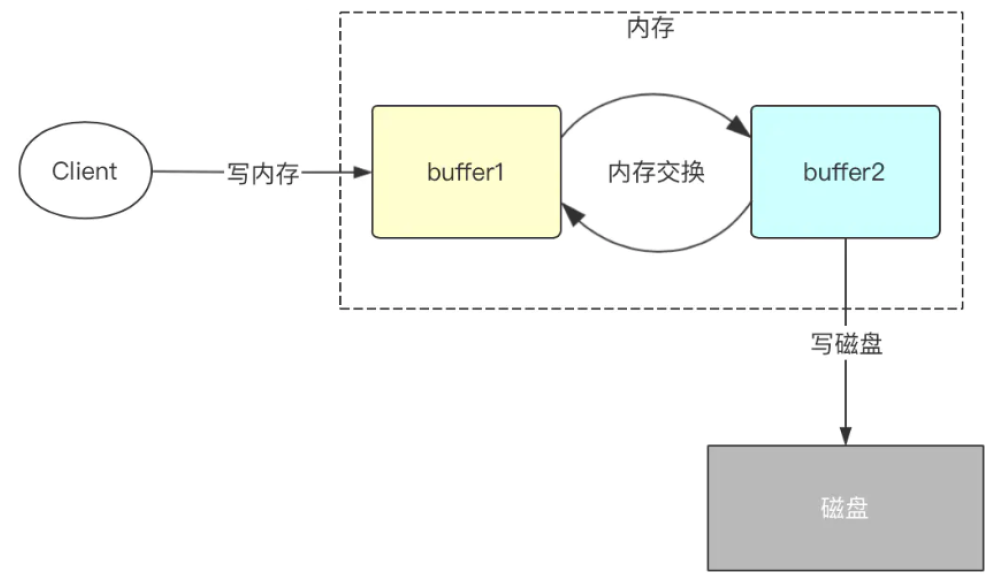
双缓冲源码分析 找到FsEditLog.java
...
void logEdit(final FSEditLogOp op) {
  Boolean needsSync = false;
  //是否同步的标识
  synchronized (this) {
    //
    assert isOpenForWrite() : "bad state: " + state;
    // wait if an automatic sync is scheduled 如果当前操作被其它线程调度,则等待1s钟
    waitIfAutoSyncScheduled();
    // check if it is time to schedule an automatic sync
    needsSync = doEditTransaction(op);
    if (needsSync) {
      isAutoSyncScheduled = true;
      //标识bufCurrent满了,进行双缓冲刷写
    }
  }
  // Sync the log if an automatic sync is required.
  if (needsSync) {
    logSync();
    //将缓冲区数据刷写到磁盘
  }
}
...
评论已关闭