微服务监控之分布式链路追踪技术Sleuth+Zipkin
分布式链路追踪技术适用场景(问题场景)
- 场景描述
为了支撑日益增⻓的庞大业务量,我们会使用微服务架构设计我们的系统,使得我们的系统不仅能够通过集群部署抵挡流量的冲击,又能根据业务进行灵活的扩展。
那么,在微服务架构下,一次请求少则经过三四次服务调用完成,多则跨越几十个甚至是上百个服务节点。那么问题接踵而来:
1)如何动态展示服务的调用链路?(比如A服务调用了哪些其他的服务---依赖关系)
2)如何分析服务调用链路中的瓶颈节点并对其进行调优?(比如A—>B—>C,C服务处理时间特别⻓)
3)如何快速进行服务链路的故障发现?
这就是分布式链路追踪技术存在的目的和意义 - 分布式链路追踪技术
如果我们在一个请求的调用处理过程中,在各个链路节点都能够记录下日志,并最终将日志进行集中可视化展示,那么我们想监控调用链路中的一些指标就有希望了,比如,请求到达哪个服务实例?请求被处理的状态怎样?处理耗时怎样?这些都能够分析出来了...
分布式环境下基于这种想法实现的监控技术就是就是分布式链路追踪(全链路追踪)。 市场上的分布式链路追踪方案
分布式链路追踪技术已经成熟,产品也不少,国内外都有,比如:
Spring Cloud Sleuth + Twitter Zipkin
阿里巴巴的“鹰眼”
大众点评的“CAT”
美团的“Mtrace”
京东的“Hydra”
新浪的“Watchman”
Apache Skywalking分布式链路追踪技术核心思想
本质:记录日志,作为一个完整的技术,分布式链路追踪也有自己的理论和概念
微服务架构中,针对请求处理的调用链可以展现为一棵树,示意如下: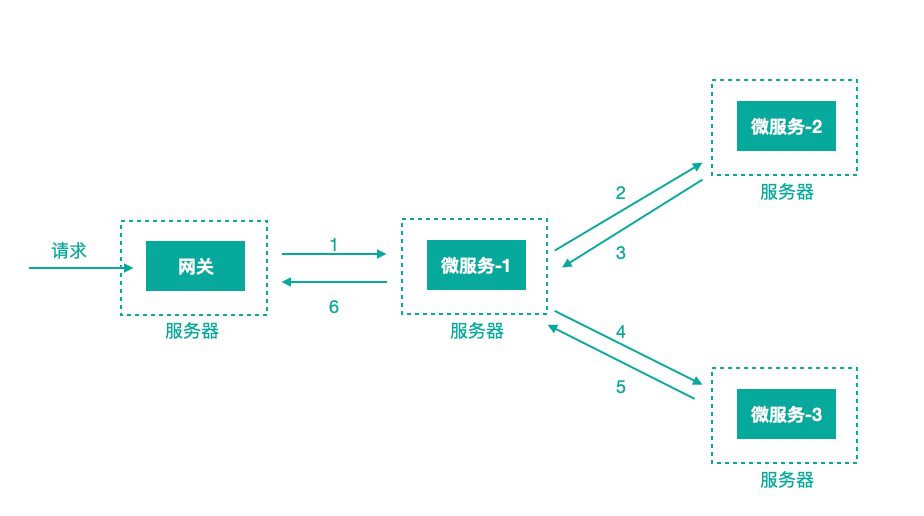
上图描述了一个常⻅的调用场景,一个请求通过网关服务路由到下游的微服务-1,然后微服务-1调用微服务-2,拿到结果后再调用微服务-3,最后组合微服务-2和微服务-3的结果,通过网关返回给用户
为了追踪整个调用链路,肯定需要记录日志,日志记录是基础,在此之上肯定有一些理论概念,当下主流的的分布式链路追踪技术/系统所基于的理念都来自于Google的一篇论文《Dapper, a Large-Scale Distributed Systems Tracing Infrastructure》,还以前面的服务调用来说这里面涉及到的核心理念: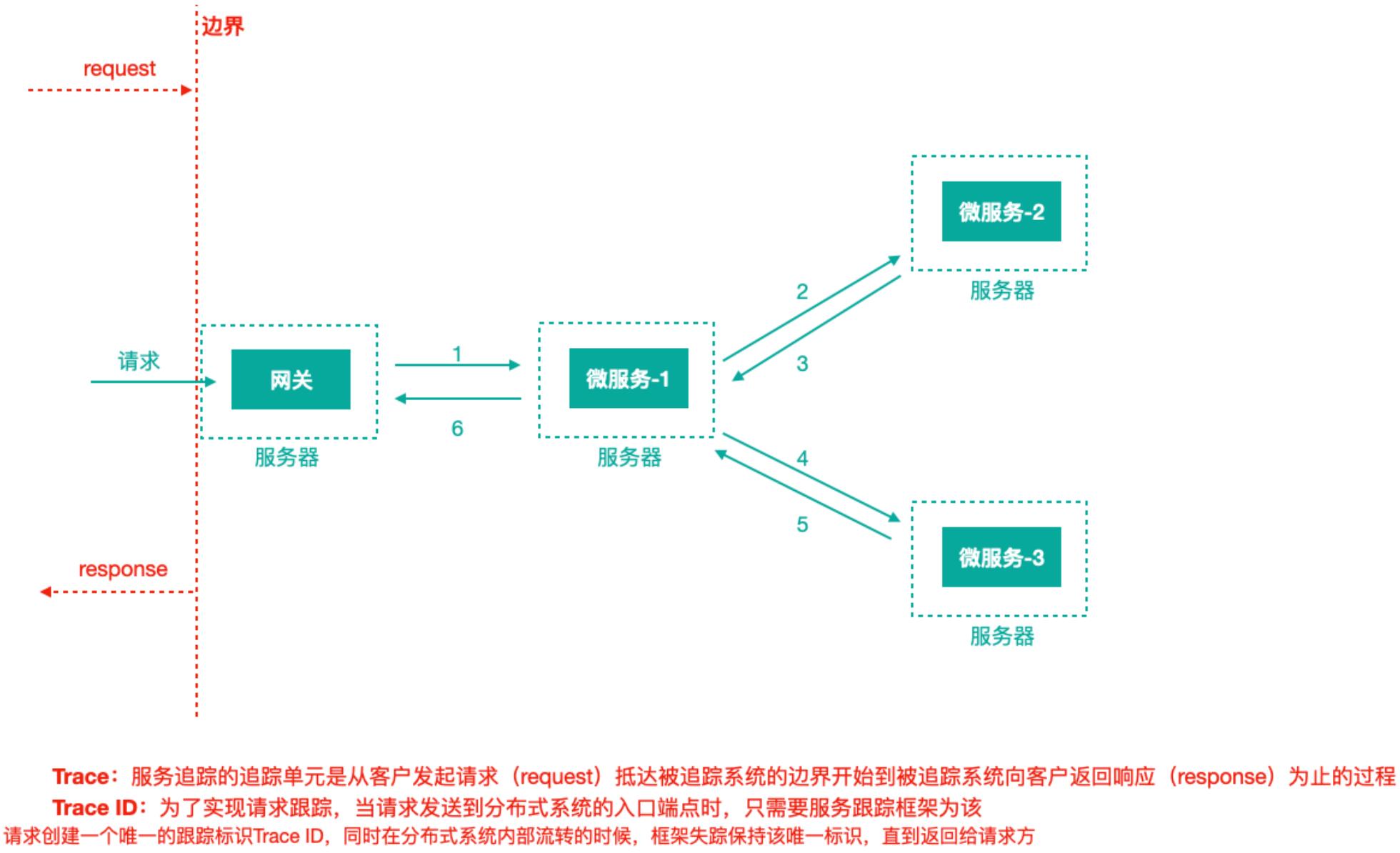
上图标识一个请求链路,一条链路通过TraceId唯一标识,span标识发起的请求信息,各span通过parrentId关联起来
Trace:服务追踪的追踪单元是从客户发起请求(request)抵达被追踪系统的边界开始,到被追踪系统向客户返回响应(response)为止的过程
Trace ID:为了实现请求跟踪,当请求发送到分布式系统的入口端点时,只需要服务跟踪框架为该请求创建一个唯一的跟踪标识Trace ID,同时在分布式系统内部流转的时候,框架失踪保持该唯一标识,直到返回给请求方
一个Trace由一个或者多个Span组成,每一个Span都有一个SpanId,Span中会记录TraceId,同时还有一个叫做ParentId,指向了另外一个Span的SpanId,表明父子关系,其实本质表达了依赖关系
Span ID:为了统计各处理单元的时间延迟,当请求到达各个服务组件时,也是通过一个唯一标识Span ID来标记它的开始,具体过程以及结束。对每一个Span来说,它必须有开始和结束两个节点,通过记录开始Span和结束Span的时间戳,就能统计出该Span的时间延迟,除了时间戳记录之外,它还可以包含
一些其他元数据,比如时间名称、请求信息等。
每一个Span都会有一个唯一跟踪标识 Span ID,若干个有序的 span 就组成了一个 trace。
Span可以认为是一个日志数据结构,在一些特殊的时机点会记录了一些日志信息,比如有时间戳、spanId、TraceId,parentIde等,Span中也抽象出了另外一个概念,叫做事件,核心事件如下- CS :client send/start 客户端/消费者发出一个请求,描述的是一个span开始
- SR: server received/start 服务端/生产者接收请求 SR-CS属于请求发送的网络延迟
- SS: server send/finish 服务端/生产者发送应答 SS-SR属于服务端消耗时间
- CR:client received/finished 客户端/消费者接收应答 CR-SS表示回复需要的时间(响应的网络延迟)
Spring Cloud Sleuth (追踪服务框架)可以追踪服务之间的调用,Sleuth可以记录一个服务请求经过哪些服务、服务处理时⻓等,根据这些,我们能够理清各微服务间的调用关系及进行问题追踪分析。
- 耗时分析:通过 Sleuth 了解采样请求的耗时,分析服务性能问题(哪些服务调用比较耗时)
- 链路优化:发现频繁调用的服务,针对性优化等
Sleuth就是通过记录日志的方式来记录踪迹数据的
我们往往把Spring Cloud Sleuth 和 Zipkin 一起使用,把 Sleuth 的数据信息发送给 Zipkin 进行聚合,利用 Zipkin 存储并展示数据。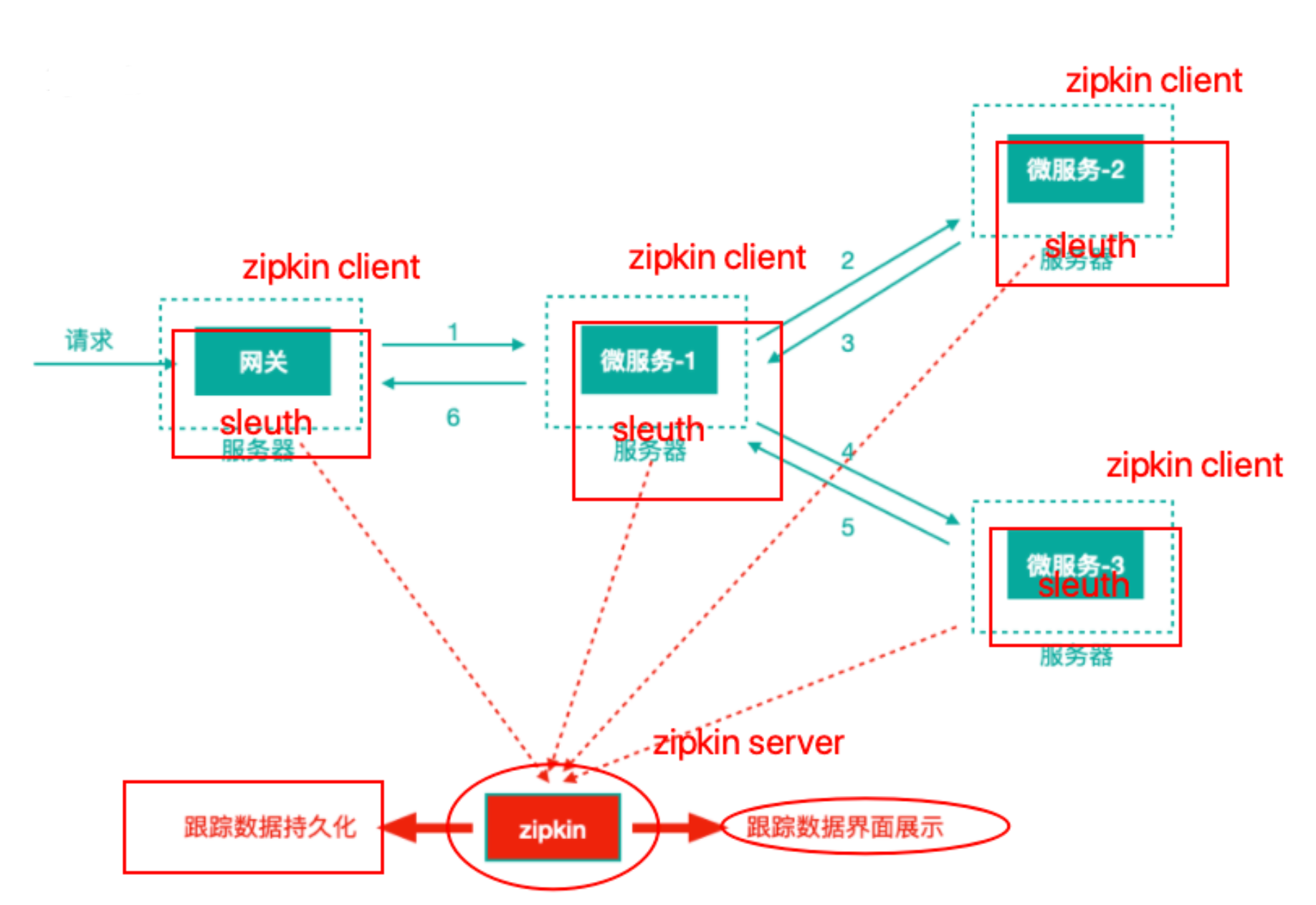
Sleuth + Zipkin
每一个需要被追踪踪迹的微服务工程都引入依赖坐标
<!--链路追踪-->
<dependency>
  <groupId>org.springframework.cloud</groupId>
  <artifactId>spring-cloud-starter-sleuth</artifactId>
</dependency>
每一个微服务都修改application.yml配置文件,添加日志级别
#分布式链路追踪
logging:
  level:
 org.springframework.web.servlet.DispatcherServlet: debug
 org.springframework.cloud.sleuth: debug
请求到来时,我们在控制台可以观察到 Sleuth 输出的日志(全局 TraceId、SpanId等)。

这样的日志首先不容易阅读观察,另外日志分散在各个微服务服务器上,接下来使用zipkin统一聚合轨迹日志并进行存储展示。- 结合 Zipkin 展示追踪数据
Zipkin包括Zipkin Server和Zipkin Client两部分,Zipkin Server是一个单独的服务,Zipkin Client就是具体的微服务。 Zipkin Server 构建
pom.xml<!--zipkin-server的依赖坐标--> <dependency> <groupId>io.zipkin.java</groupId> <artifactId>zipkin-server</artifactId> <version>2.12.3</version> <exclusions> <!--排除掉log4j2的传递依赖,避免和springboot依赖的日志组件冲突--> <exclusion> <groupId>org.springframework.boot</groupId> <artifactId>spring-boot-starter-log4j2</artifactId> </exclusion> </exclusions> </dependency> <!--zipkin-server ui界面依赖坐标--> <dependency> <groupId>io.zipkin.java</groupId> <artifactId>zipkin-autoconfigure-ui</artifactId> <version>2.12.3</version> </dependency>入口启动类添加@EnableZipkinServer注解,用于开启Zipkin Server功能
application.ymlserver: port: 9411 management: metrics: web: server: # 关闭自动检测请求 auto-time-requests: falseZipkin Client构建(在具体微服务中修改)
pom中添加zipkin依赖<dependency> <groupId>org.springframework.cloud</groupId> <artifactId>spring-cloud-starter-zipkin</artifactId> </dependency>application.yml中添加对zipkin server的引用
spring:
  application:
 name: service-consumer
  zipkin:
 # zipkin server的请求地址
 base-url: http://127.0.0.1:9411
 sender:
   # web 客户端将踪迹日志数据通过网络请求的方式传送到服务端,另外还有配置
   # kafka/rabbit 客户端将踪迹日志数据传递到mq进行中转
   type: web
  sleuth:
 sampler:
   # 采样率 1 代表100%全部采集 ,默认0.1 代表10% 的请求踪迹数据会被采集
   # 生产环境下,请求量非常大,没有必要所有请求的踪迹数据都采集分析,对于网络包括server端压力都是比较大的,可以配置采样率采集一定比例的请求的踪迹数据进行分析即可
   probability: 1
另外,对于log日志,依然保持开启debug状态
logging:
  level:
 org.springframework.web.servlet.DispatcherServlet: debug
 org.springframework.cloud.sleuth: debug
Zipkin server⻚面方便我们查看服务调用依赖关系及一些性能指标和异常信息
追踪数据Zipkin持久化到mysql(官方还支持elasticsearch、cassandra)
mysql中创建名称为zipkin的数据库,并执行如下sql语句(官方提供)-- -- Copyright 2015-2019 The OpenZipkin Authors -- -- Licensed under the Apache License, Version 2.0 (the "License"); you may not use this file except -- in compliance with the License. You may obtain a copy of the License at -- -- http://www.apache.org/licenses/LICENSE-2.0 -- -- Unless required by applicable law or agreed to in writing, software distributed under the License -- is distributed on an "AS IS" BASIS, WITHOUT WARRANTIES OR CONDITIONS OF ANY KIND, either express -- or implied. See the License for the specific language governing permissions and limitations under -- the License. -- CREATE TABLE IF NOT EXISTS zipkin_spans ( `trace_id_high` BIGINT NOT NULL DEFAULT 0 COMMENT 'If non zero, this means the trace uses 128 bit traceIds instead of 64 bit', `trace_id` BIGINT NOT NULL, `id` BIGINT NOT NULL, `name` VARCHAR(255) NOT NULL, `remote_service_name` VARCHAR(255), `parent_id` BIGINT, `debug` BIT(1), `start_ts` BIGINT COMMENT 'Span.timestamp(): epoch micros used for endTs query and to implement TTL', `duration` BIGINT COMMENT 'Span.duration(): micros used for minDuration and maxDuration query', PRIMARY KEY (`trace_id_high`, `trace_id`, `id`) ) ENGINE=InnoDB ROW_FORMAT=COMPRESSED CHARACTER SET=utf8 COLLATE utf8_general_ci; ALTER TABLE zipkin_spans ADD INDEX(`trace_id_high`, `trace_id`) COMMENT 'for getTracesByIds'; ALTER TABLE zipkin_spans ADD INDEX(`name`) COMMENT 'for getTraces and getSpanNames'; ALTER TABLE zipkin_spans ADD INDEX(`remote_service_name`) COMMENT 'for getTraces and getRemoteServiceNames'; ALTER TABLE zipkin_spans ADD INDEX(`start_ts`) COMMENT 'for getTraces ordering and range'; CREATE TABLE IF NOT EXISTS zipkin_annotations ( `trace_id_high` BIGINT NOT NULL DEFAULT 0 COMMENT 'If non zero, this means the trace uses 128 bit traceIds instead of 64 bit', `trace_id` BIGINT NOT NULL COMMENT 'coincides with zipkin_spans.trace_id', `span_id` BIGINT NOT NULL COMMENT 'coincides with zipkin_spans.id', `a_key` VARCHAR(255) NOT NULL COMMENT 'BinaryAnnotation.key or Annotation.value if type == -1', `a_value` BLOB COMMENT 'BinaryAnnotation.value(), which must be smaller than 64KB', `a_type` INT NOT NULL COMMENT 'BinaryAnnotation.type() or -1 if Annotation', `a_timestamp` BIGINT COMMENT 'Used to implement TTL; Annotation.timestamp or zipkin_spans.timestamp', `endpoint_ipv4` INT COMMENT 'Null when Binary/Annotation.endpoint is null', `endpoint_ipv6` BINARY(16) COMMENT 'Null when Binary/Annotation.endpoint is null, or no IPv6 address', `endpoint_port` SMALLINT COMMENT 'Null when Binary/Annotation.endpoint is null', `endpoint_service_name` VARCHAR(255) COMMENT 'Null when Binary/Annotation.endpoint is null' ) ENGINE=InnoDB ROW_FORMAT=COMPRESSED CHARACTER SET=utf8 COLLATE utf8_general_ci; ALTER TABLE zipkin_annotations ADD UNIQUE KEY(`trace_id_high`, `trace_id`, `span_id`, `a_key`, `a_timestamp`) COMMENT 'Ignore insert on duplicate'; ALTER TABLE zipkin_annotations ADD INDEX(`trace_id_high`, `trace_id`, `span_id`) COMMENT 'for joining with zipkin_spans'; ALTER TABLE zipkin_annotations ADD INDEX(`trace_id_high`, `trace_id`) COMMENT 'for getTraces/ByIds'; ALTER TABLE zipkin_annotations ADD INDEX(`endpoint_service_name`) COMMENT 'for getTraces and getServiceNames'; ALTER TABLE zipkin_annotations ADD INDEX(`a_type`) COMMENT 'for getTraces and autocomplete values'; ALTER TABLE ADD INDEX(`a_key`) COMMENT 'for getTraces and autocomplete values'; ALTER TABLE zipkin_annotations ADD INDEX(`trace_id`, `span_id`, `a_key`) COMMENT 'for dependencies job'; CREATE TABLE IF NOT EXISTS zipkin_dependencies ( `day` DATE NOT NULL, `parent` VARCHAR(255) NOT NULL, `child` VARCHAR(255) NOT NULL, `call_count` BIGINT, `error_count` BIGINT, PRIMARY KEY (`day`, `parent`, `child`) ) ENGINE=InnoDB ROW_FORMAT=COMPRESSED CHARACTER SET=utf8 COLLATE utf8_general_ci;pom文件引入相关依赖
<dependency>
  <groupId>io.zipkin.java</groupId>
  <artifactId>zipkin-autoconfigure-storage-mysql</artifactId>
  <version>2.12.3</version>
</dependency>
<dependency>
  <groupId>mysql</groupId>
  <artifactId>mysql-connector-java</artifactId>
</dependency>
<dependency>
  <groupId>com.alibaba</groupId>
  <artifactId>druid-spring-boot-starter</artifactId>
  <version>1.1.10</version>
</dependency>
<dependency>
  <groupId>org.springframework</groupId>
  <artifactId>spring-tx</artifactId>
</dependency>
<dependency>
  <groupId>org.springframework</groupId>
  <artifactId>spring-jdbc</artifactId>
</dependency>
修改配置文件,添加如下内容
spring:
  datasource:
 driver-class-name: com.mysql.jdbc.Driver
 url: jdbc:mysql://localhost:3306/zipkin?useUnicode=true&characterEncoding=utf-8&useSSL=false&allowMultiQueries=true
 username: root
 password: 123456
 druid:
   initialSize: 10
    minIdle: 10
    maxActive: 30
    maxWait: 50000
# 指定zipkin持久化介质为mysql
zipkin:
  storage:
 type: mysql
启动类中注入事务管理器
@Bean
public PlatformTransactionManager txManager(DataSource dataSource) {
  return new DataSourceTransactionManager(dataSource);
}
评论已关闭